My first projector is a dream (but setting it up wasn’t)

I recently made the switch from a TV to a projector and while having a giant screen at home might sound like the perfect experience, there are way more trade-offs that I wasn’t aware of when I set it up.

Don’t get me wrong, having a giant screen is an incredible experience and the projector I used is fantastic, but I’ve learned that you really want to be able to permanently set up a projector since taking it down and putting it back up every time you want to watch something is a pain.

What projector I used

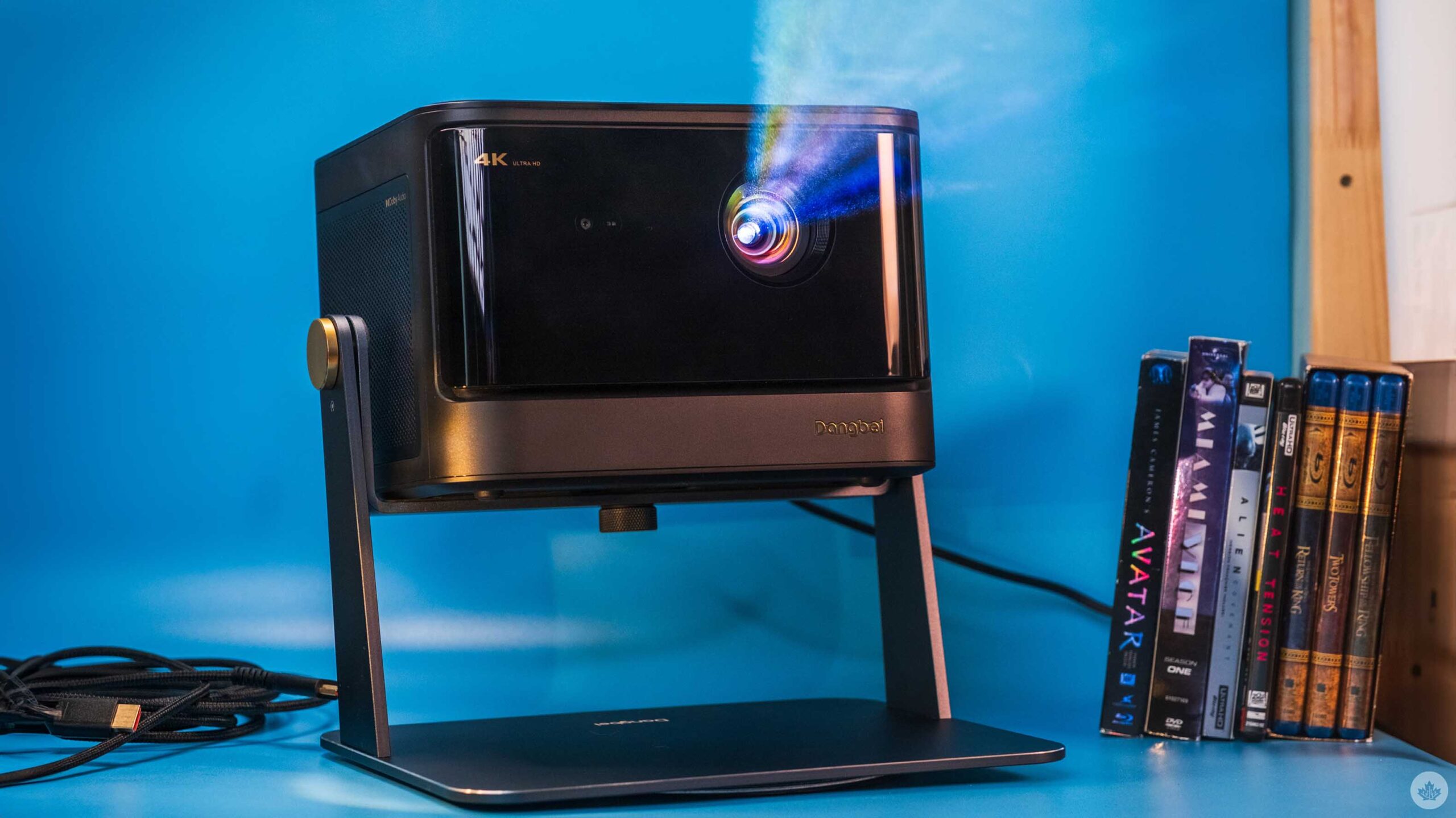
I was lucky enough to get my hands on the Dangbei DBOX02 4K laser projector, and it’s been stunning. The unit can project a 4K screen up to 200-inches and has a peak brightness of 2,450 ISO lumens. It also has built-in speakers and 2 HDMI ports and runs Google TV.

There are also two USB ports on the back, an Ethernet jack, optical audio and a headphone jack.

Overall, this is a pretty big and bulky projector, but it provides a really clear and bright image that I find is worth the trade-off. It’s also one of the few projectors that’s “Netflix approved,” which just means that it’s bright and has pretty good colour reproduction.

Since it’s a projector it also gets quite hot, but the fans inside are quiet and after using it for a few weeks I’ve never heard the fans kick onto high. All in all, it’s an impressive unit, but integrating it into my home has been a struggle.

Setting it up

Luckily my living room is pretty dark by default. With light from a nearby window the projector is not as washed out as you’d expect.

The first thing you need to know about my living room (where I watch all my TV) is that I have a fairly vintage wallpaper pattern. While I thought it was fun when I moved in, It does mean I need a screen to be able to watch content. Beyond that, there are two large windows in my living room and only one of them has curtains on it — at least part of it. There’s also a large stained glass portion above it that’s not covered.

While the marketing claims you can watch TV during the day with the DBOX02, in reality, it’s pretty washed out when the lights are on. It’s possible, but I assume if you’re a movie nerd who’s going down the projector rabbit hole, you want the picture to look as good as possible. That means you need to watch in a dark room. So if I’m watching something before the sun goes down, I need to hang a sound blanket over one window and stack some cushions from a little bench in my living room to cover the stained glass. Someday I’ll install blackout curtains, but for now, I mainly watch at night.

This slideshow requires JavaScript.

The next hurdle in setting up your projector is placing it in the perfect spot. Since the projector needs to be as far away from the screen as possible, most people will need to find some way to either hang it from their ceilings or place it behind where they sit. I decided to place mine behind my couch, but that required me to buy a projector stand. This is basically a tripod with only one leg and a really heavy base to make sure the projector doesn’t tip over. However, I will say the DBOX02 is pretty heavy so the stand does wobble a bit. It’s also just tall enough to see over me perfectly, so if I sit in the centre of my couch and lean forward to grad something from the table, you can see the shadow of the top of my head.

It’s also worth pointing out that the higher you raise the projector above the height of the screen, the more offset the picture will be. You can offset this in the settings with something called ‘Key-stoning’ but this only affects the picture, not the light output. This means for me that while I have a nice rectangular screen to watch, the light around it is more like a trapezoid. Lots of people paint the area around their projector screens a dark colour to absorb some of this light overshine effect, but since I rent that wasn’t an option for me. Most of the time it’s unnoticeable, but in dark scenes it sometimes makes it look like the screen is out of whack.

Now the final piece of the puzzle is the actual screen. If you have a white wall you can start with that, but if you don’t, you’ll need to buy a screen. I was able to bootleg a screen together from some old seamless paper, chandelier chains and a long section of PVC pipe. This was cheaper than a real screen, but only slightly, and the paper doesn’t sit as flat as I wanted. This looks fine for most things, but sometimes, when the camera pans in a scene, the subtle warping in the paper can make the pan look weird. It’s something I can look past, but I’ve been trying to find a way to flatten the paper to alleviate it.

That wasn’t all I needed, either. Since the projector now sits behind me, I had to get a 20-foot HDMI cable to connect it to my game consoles or soundbar, depending on what I wanted to do.

Overall, I went cheap with my setup and it still cost me over $200 to get the screen, stand and HDMI cable. If I would have gotten a real screen and actual blackout curtains I think I’d be closer to $400 in setup costs. If I really had my way, I’d paint the room a darker colour, especially the ceiling to help cut down on light reflections in the room. This would make the end picture look better, but again, it would be another couple hundred dollars and a lot of labour.

Am I going to be a projector guy now?

Honestly, for all these pain points, I’m still in love with DBOX02 projector. Having a giant 115-inch screen in my living room is amazing. Sure, it’s a hassle to set up and use with my soundbar, but at the end of the day, once the lights go off, the movie watching experience it provides is stellar and, in a lot of ways, more fun. It’s hard to describe but there’s something about the giant screen that just makes me want to make some popcorn and pay more attention to the screen than my TV.

I was also worried about lag for gaming, but I found it to be still very playable. Hardcore gamers are likely going to upset by the minimal lag, but I think people who play mostly console single-player games will be fine. Honestly, Ghost of Tsushima looks amazing when blown up on a giant screen.

Beyond that, I have been using the built-in speakers on the DBOX02 and, while it is weird to have the main audio come from behind you, they perform quite well and have a pretty good stereo separation. They also get loud, but I’ve found that since the speaker is right behind my head now, I don’t need to run it as loud as when I use the soundbar across the room in front of the screen.

I’ve also been using the projector connected to my Apple TV 4K, but it does run Google TV which I’ve only tested a bit. To be honest, I found the startup time to get to the basic apps was pretty slow and so most often I would switch it to the Apple TV input as fast as possible. However, I did need to use the built-in Google interface to set focus on the projector and to keystone my screen and both features were easy to use and understand. There’s even a button on the remote to quickly autofocus the projector. It would have been great for this to take users to the focus/keystone menu and let them choose which feature they need.

Overall, I think I’m going to stick with the projector for the time being since I love watching movies and TV on the giant screen. If you’re looking into getting one make sure you tally up all the accessories you’ll need and find a nice place to put it. If you can fit it into your life it’s definitely worth it.

You can check out the DBOX02 projector on Dangbei’s website. It retails for $1,499 USD (roughly $2,054 CAD). You can also get it on Amazon.ca where it’s listed for $2,600.

MobileSyrup may earn a commission from purchases made via our links, which helps fund the journalism we provide free on our website. These links do not influence our editorial content. Support us here.

Luigi’s Mansion 2 HD is a ghoulishly good time

When I think about it, the 3DS might be my most used Nintendo system of all time, outside of the Switch, given its incredibly varied catalogue and portable functionality.

And yet, a major 3DS blind spot for me has always been Luigi’s Mansion: Dark Moon, Vancouver-based Next Level Games’ best-selling second entry in Nintendo’s ghost-focused action-adventure series. On top of that, I never played much of Luigi’s Mansion 3, its Switch-exclusive sequel, as my fellow MobileSyrup Brad handled that review for us instead. Therefore, I’ve really enjoyed having Luigi’s Mansion 2 HD, a new Switch remaster of Dark Moon, as my first real introduction to the series.

That starts with the presentation. Luigi has always appealed to me more than the ever-confident Mario, given that the green-clad brother is a rather endearingly timid goofball, and that’s reflected throughout Luigi’s Mansion 2. Whether it’s his Scooby Doo-esque frightened reactions to ghosts or the way he uneasily hums along to the music as you walk around, Luigi’s Mansion 2 just oozes character. Naturally, there’s not much of a story here (Luigi has to explore different mansions within Evershade Valley to collect pieces of the Dark Moon and recapture King Boo), but the game’s ample personality more than makes up for that. That tone ensures that this is one “spooky game” that’s suitable for all ages.

Enhancing all of this is a commendable visual overhaul that brings Luigi’s Mansion 2 more in line with Switch-level visuals. Of course, you can still tell it’s not quite a modern game, given the relative simplicity of some environments and animations, but it’s nonetheless a noticeable graphical upgrade. Meanwhile, other modernization comes in the form of the minimap having been brought to the top-right of the screen (rather than the lower of the 3DS’ displays) and better spacing out of some of the inputs thanks to the Switch’s increased number of buttons over the 3DS.

These improvements complement the core ghost-catching gameplay loop, which remains incredibly compelling. With his handy Poltergust 5000 and attached Strobulb-enhanced flashlight, Luigi can stun and then suck up ghosts that he encounters in a bout of tug of war with the analogue stick. Basic ghouls are simple enough to ensnare, but larger variants put up more of a struggle, resulting in gleefully frantic chases around a given room that can get even more chaotic when other hazards like demonic rats and flying books are thrown into the mix.

Outside of combat, the utility of Luigi’s gear also gradually expands in some clever ways, like a ‘Dark Light’ to reveal hidden objects and doors and the ability to inflate and latch onto balloons to reach higher places. And because rooms tend to be small, you’re encouraged to blow through every corner with the Poltergust to find goodies like hearts, coins and even life-saving ghost dog bones, be they under a rug, behind a window curtain, or even atop a ceiling fan, thus adding even more depth and texture to the world. Meanwhile, the mansions themselves are impressively varied from a thematic standpoint, starting with a simple haunted house setup but soon including the likes of a sandy clock tower, a monstrous plant-filled botanical garden and frigid coal mines.

Luigi's Mansion 2 HD ghost

The only major shortcoming of Luigi’s Mansion 2 HD lies in its mission-based campaign. After completing a certain objective, like finding four cogs to operate a lift, Professor E. Gadd will return Luigi to his bunker before sending him back. This fragmented structure might be more palatable if you’re playing in chunks on the go, but my time with Luigi’s Mansion 2 HD has primarily been in TV mode, so it feels like unnecessary padding in between the engaging moment-to-moment exploration and ghost encounters. This also might take some getting used to if you’re coming from the open-ended areas of Luigi’s Mansion 3.

And while it’s not a flaw of Luigi’s Mansion 2 HD itself, it’s tough to swallow $79.99 for a remaster of an 11-year-old 3DS game. (Especially when, by contrast, last year’s Metroid Prime Remastered has the far more reasonable cost of $49.99). Maybe if the original Luigi’s Mansion was thrown in to make this a double-pack, but with just this sequel remaster, that full price tag is harder to justify. It’s worth noting that I didn’t get a chance to try out Luigi’s Mansion 2 HD‘s trio of four-player multiplayer modes (two of which are “catch all of the ghosts,” while one is “find the exit”), which should, to be fair, add a bit more value. Even still, though, $79.99 for an older game will undoubtedly be a pretty big ask for some.

Luigi's Mansion 2 HD running from plant

What I can say, for my part, is that Luigi’s Mansion 2 HD is an excellent game that’s just bursting with charm, inventive gameplay and delightful Haunted Mansion-style levels. I’m also just glad it’s now found a home on Switch, as it gives people like me the chance to properly check it out. Here’s hoping Kid Icarus: Uprising is the next 3DS game to make the jump to Switch!

Luigi’s Mansion 2 HD will launch exclusively on Nintendo Switch on June 27th.

Image credit: Nintendo

MobileSyrup may earn a commission from purchases made via our links, which helps fund the journalism we provide free on our website. These links do not influence our editorial content. Support us here.

The new Beats Pill is a fantastic speaker with a questionable control scheme

The new Beats Pill Speaker is the best Bluetooth speaker Apple has ever made. It sounds crisp and the soundstage that comes out of its small frame is nothing to scoff at. Combine that with much needed improvements like waterproofing and multi-day battery life, and this Pill is not only improving on the older Pill and Pill+, but it’s also finally making a play to be the best Bluetooth speaker on the market, bar none.

That’s not to say it’s perfect, though. There are too many features packed inside this little speaker for all its buttons to handle, so it’s more confusing than I’d like. That said, for its $199 price point, the new Pill beats out most of its class.

Great first impressions

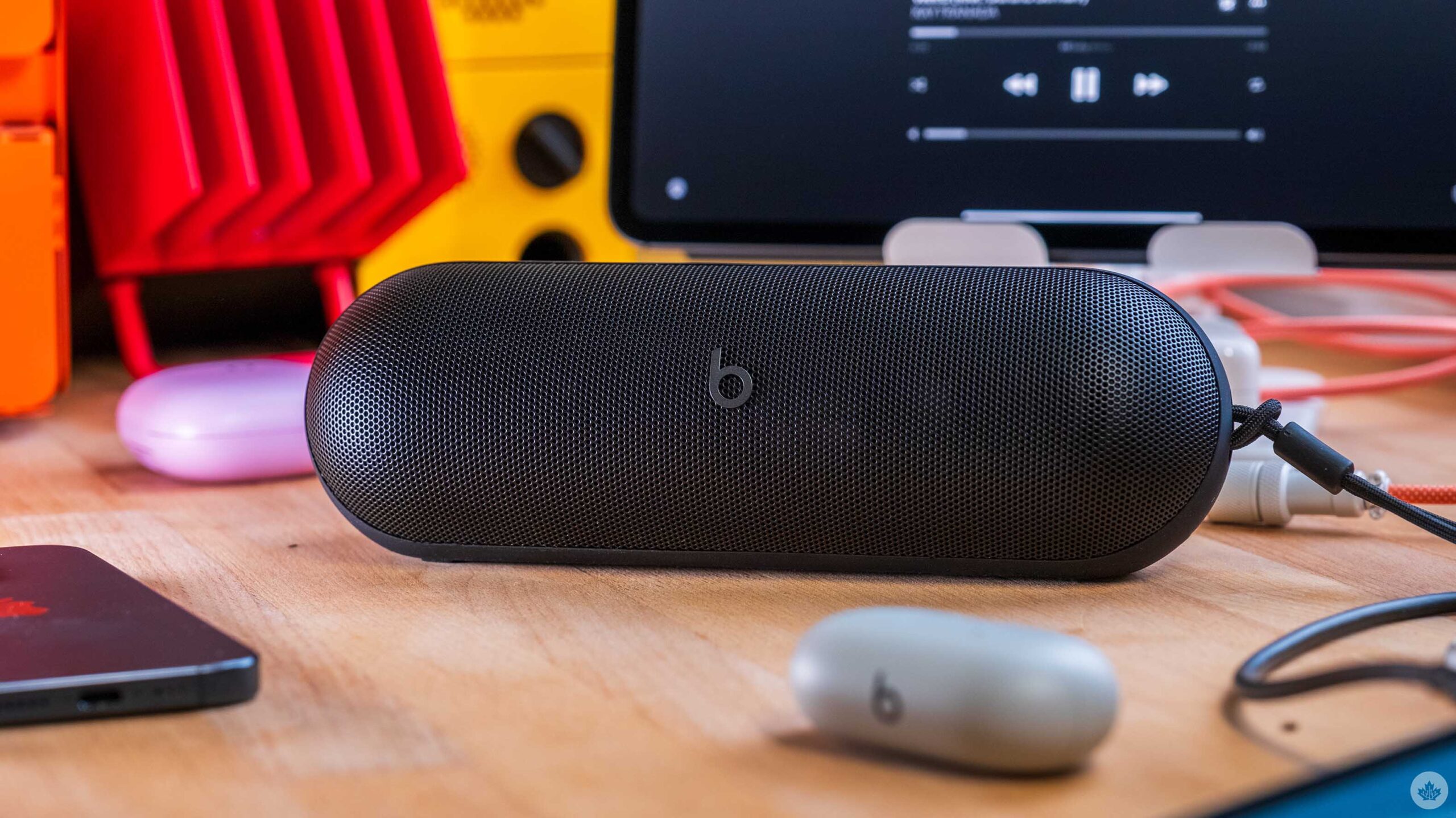
Out of the box, the new Pill is sleek and smaller than I expected. It’s still pretty close to the same size as a standard UE Boom 3, but since it sits horizontally, it feels a little smaller. It also feels great in the hand with a soft-touch silicon wrapping around most of the device. It also fits into my hand really nicely. The grill on the front is metal and feels tough enough not to crack off dropped. My review unit is the Black model, but you could also get one in the fun Gold Champagne colour or classic Beats Statement Red. From what I’ve seen in the marketing materials the Champagne Gold option is the most modern looking, but I’m sure most people will end up with the non-descript black option.

The most surprising part of the speaker is actually how fun it sounds. Like many other Beats products, the sound profile you get from the new Pill is incredibly bass-forward. This brings a nice punch to a lot of music, but I’ve found as you get above 50-70 percent volume, it kicks really hard. My first reaction was, “This is awesome.” But after using it for a few more hours, I found the speaker a little overbearing for songs that already push the bass high. Balanced rock and roll songs or something classical sounded better, with nice but noticeable bass hits for such a small speaker. For example, something like ‘Boys in the Better Land’ by Fontaines D.C. played really nicely with the new Pill, but ‘Liquor Store’ by Remi Wolf, a newer rap/pop song, pushes the bass so high that it overshadows other elements of the track.

Overall, I really like this speaker’s sound profile and when you combine that with its portability and battery life, it’s hard to beat.

You can hear a great example of this overshadowing effect by listening to ‘Confessions, Pt. III’ by Toronto’s own BADBADNOTGOOD. This song is an instrumental saxophone-based track, but on the Pill the bass overshadows the sax every once in a while. It should feel more even with the sax front and centre. At the end of the day, this comes down to personal preference, and I’m pretty split on it. Sometimes, I find it to be a tad distracting when I’m sitting and listening to music at my desk. Other times, it fills a room with sound, and the punch of the bass just makes me want to dance. Either way, after a prolonged listening session, I found myself able to get lost in the music really easily, so I think most people will enjoy this speaker. Just be warned if you hate when the bass EQ is pushed up a  new notches.

The reason the new Pill is so bass-heavy is because Apple has re-engineered it with a larger woofer. Most speaker devices actually use two speaker units to produce a wide range of sounds. The ‘woofer’ handles the low-end frequencies like bass, while the ‘tweeter’ handles everything else. Other speakers in this size range might use two tweeters or a passive radiator to help even out lower-end frequencies, so adding the woofer can produce a wider soundstage. This is definitely true with the new Pill, but as I mentioned above, the bass can feel a little hot. That said, it has a powerful room-filling sound, and the larger the space and the further you are from it, the more balanced the bass feels.

Other features

Beats has also packed the new Pill with a ton of cool software features and other improvements outside of the realm of sound quality.

The upgrades that make me happy are the 24-hour battery life with the ability to quick charge. The press info states that 10-minutes on the charger should result in around two hours of music playback. You can also use the speaker as a portable battery if your phone dies before the Pill does.

Combine that with the new fabric handle and the IP67 water/dustproof rating, and this little speaker is ready to go on any weekend adventure you throw at it. Plus, if you have two, you can connect them together for ‘Amplify mode.’ This mode is for setting up a defacto multi-room audio setup at a party. Both speakers will output mono sound together, letting you play music in multiple places at once. If you’re having a smaller get-together or want to listen to music in stereo, you can enable ‘Stereo mode,’ which assigns the left and right channels to each speaker for a more immersive listening experience.

To sweeten the deal, the speaker can also plug into your phone and play lossless audio and work as a portable battery. Smaller devices like a phone or wireless earbuds will automatically get charged. Larger devices like laptops and tablets will use logic to determine if the speaker should charge off them or if it should act as a battery. You can also triple-tap the power button to reverse the charging direction. This is really handy, and something I’ve used on my Sonos Move many times.

One of my main points of contention with the new Pill is how few buttons it has for its plethora of controls. For instance, the power button has six different functions.

  • Power on/off (hold for more than 0.8 seconds, but less than three)
  • Pairing (press and hold for over three seconds)
  • Voice Assistant (double tap)
  • Battery status (quick tap, less than 0.8 seconds)
  • Change charging direction (triple tap)
  • USB-C audio pass through (press and hold button while plugging in USB-C cable)

This is way too much for one button. I’m even a huge nerd who’s studied these controls, and written them down in this article, and I know I’m going to forget. Even over the two days I’ve been testing the speaker, I’ve found it really annoying to turn on/off, and I’ve accidentally set it into pairing mode many times. Sonos had this same problem on its Sonos Roam from 2021 and it recently updated that speaker to add a dedicated pairing button.

That’s not all, either. There’s a button in the middle of the speaker that works similarly to buttons on most headphones/earbuds, but more complex.

  • Play/pause (tap once)
  • Skip forwards (tap twice)
  • Skip backwards (tap three times)
  • Enter Amplify mode (press and hold the middle button on two Pills at once)
  • Enter Stereo mode (press and hold the centre button and volume up after pairing in Amplify mode)
  • Break apart speaker group (Press and hold centre button and volume down)

Again, this is too many controls for one button. I would forgive this if there was some sort of app we could use to enable all these settings without a cheat sheet handy, but there’s no real app for the new Pill.  There is a version of the Beats app on Android, but it only allows you to tweak some button commands, like muting yourself during a call. You can also change the name of the speaker and add the speaker to the Android Find My Device network. On iOS, these features appear in the Settings app like AirPods. There is nowhere in the speaker settings page to adjust the EQ.

I would love to see more buttons added to a future Pill for pairing and for Amplify/Stereo modes. Hiding these cooler (yet admittedly niche) features behind a cryptic button combo is too complicated for most people to even remember, and too finicky for nerds to even want to enable them.

Almost the perfect Bluetooth speaker

At the end of the day, there’s a lot to love about the new Pill – it sounds great, the battery life is stellar and it has a lot of niche features for people looking to get the most out of their purchase. Which is why it’s so weird that there is no app for easy control of the extra features. Hiding everything behind complex button presses is not a great way to make an accessible speaker. Even turning it on and off requires more thought and timing than it should.

It’s also worth pointing out that the physical manual the speaker comes with is pitiful. It’s a tiny piece of folded paper with a QR code on the outside. When you unfold it, there are a few quick controls laid out, but it doesn’t even mention how to turn the speaker off, which as I found out, is more complex than it needs to be.

The other major thing holding me personally back from the Beats Pill is the fact that it doesn’t float. This is a small thing, but I spend a lot of time camping and canoeing in the summers, so I really like the UE Boom 3 and Wonder Boom 3 since they both float if you accidentally drop them in water. This is really handy when you’re in deep water like a lake. The Pill would be fine for most scenarios since it can take a few splashes, but the peace of mind knowing that if my boat flips, I won’t lose my speaker has always been reassuring to me.

At the end of the day, this is a really great Bluetooth speaker, and if you’re the type of person that usually cranks up the bass when you get control of the EQ, this speaker is for you.

The Beats Pill is $199 in Canada. 

MobileSyrup may earn a commission from purchases made via our links, which helps fund the journalism we provide free on our website. These links do not influence our editorial content. Support us here.
Razr+ 2024 Hands-on: On the right flippin’ track

Motorola has announced its two latest entries to the Razr lineup, the 2024 Razr and Razr+. The company’s headlining Razr+ smartphone will come to Canada next month. However, the base Razr isn’t available in Canada. While at first glance, neither is all that impressive, there’s a reason why Motorola has most of the market share on this form factor of foldables in North America.

These are only my initial thoughts about the devices. I’ll mostly focus on the Razr+, considering the Razr lacks Canadian availability. But it’s worth mentioning that the base Razr now looks similar to last year’s Razr+, and with that in mind, it’s a great option considering the $699 USD price point. The star of the show, the Razr+, has a sleeker design and feels more solid compared to its predecessor, which is exactly what you want when you’re using a folding smartphone.

Even bigger external display

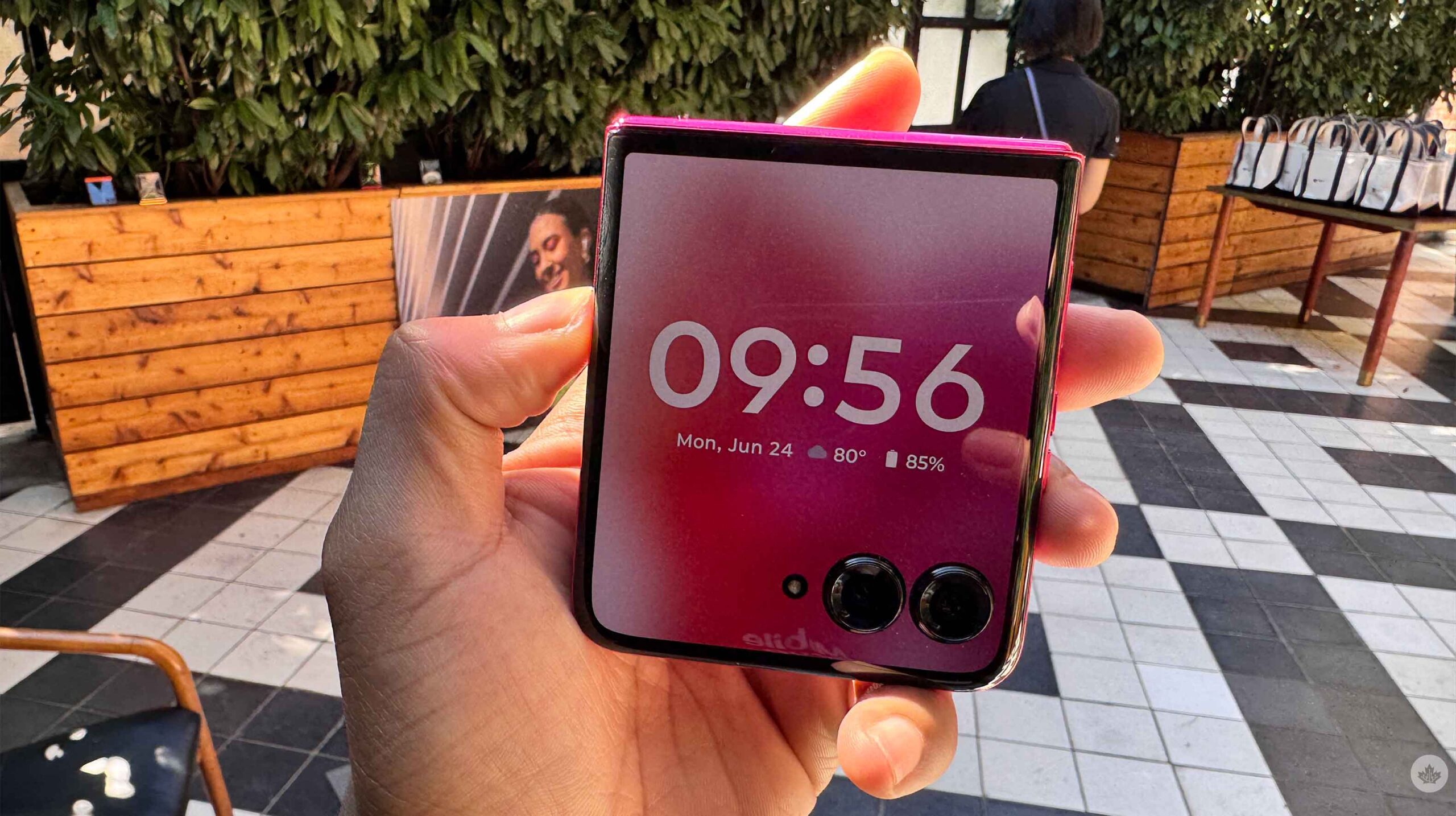
The Razr+’s front looks incredibly sleek, thanks to its smaller bezels and larger 4-inch HDR10+ display. Last year, I was already impressed by the Razr+ 2023 external screen, but this year’s model is even better. It also sports a 1272 x 1080-pixel resolution, up to 165Hz refresh rate, 2400 nits of brightness, and even a touch rate of 120Hz (165Hz when you’re gaming), making the phone feel incredibly speedy when you’re swiping through it.

This year, it also has an Always On Display that shows the time, date, battery percentage, and notification icons. When you activate the cover display, the colour returns to the screen, and you can see your lock screen properly. It’s a small touch that other OEMs have done in the past, but it looks even nicer when your handset is folded and you see the small square-shaped screen.

When you flip the phone to its rear, you’ll see the soft vegan leather in one of four colours: Spring Green, Peach Fuzz, Midnight Blue and Hot Pink. While the headlining colour this year is Peach Fuzz, Spring Green is my favourite of the four, and it breaks my heart that my review unit isn’t that pretty green variant.

The Razr+ also has a 6000 series aluminum frame, making the handset more durable. Nick Gray from Phandroid dropped one of the hands-on units, and even though it sounded like it should have broken, the handset was fine. I’m not saying it has a MIL-STD grading, but considering the leather back, the handset isn’t as breakable as many others on the market.

On the bigger cover screen, you can do more than before. For instance, you can activate Google Assistant (or Gemini) without opening or unlocking your handset (depending on your query). You can add even more panels (or home screens) with widgets, contacts, Google Fit, and specifically one for Spotify. Similar to last year, an ‘Extended View’ option extends the screen past the dual cameras.

Flip it open

When you flip open the Razr+, you’re greeted with a 6.9-inch LTPO pOLED primary screen with a 2640 x 1080-pixel resolution, up to 165Hz refresh rate, 240Hz touch sampling rate (or 360Hz when gaming) and an astonishing 3000 nits of brightness.

The display looked good, but I’ll have to spend more time watching content, looking at pictures, and checking out the peak brightness on a sunny day.

The device also sports Android 14, 256GB of built-in storage, 12GB of RAM and Snapdragon 8s Gen 3. It also has a 4,000mAh battery with 45W turbo power charging and IPx8. While this is all nice on paper, I’ll have to put the Razr+ through its paces before deciding whether this 4,000mAh battery is worth it or if 12GB of RAM and the Snapdragon 8s Gen 3 are enough to power the handset.

It’s awesome that Motorola improved the waterproofing on this handset compared to its predecessor. An IPx8 rating means you can take your Razr+ underwater or in the shower if you don’t want to stop watching your TV shows.

Hello Moto

This year, the Razr+ sports a 50-megapixel primary shooter and a 50-megapixel telephoto camera with 2x optical zoom. This replaces the ultrawide on last year’s model. Personally, I prefer an optical sensor versus an ultrawide, so I’m happy for this change. However, a 2x optical is mostly designed for portraits, which is nice because I love taking pictures of myself and my friends, but 2x zoom isn’t a lot, and you won’t be using it like the 5x zoom on Samsung’s Galaxy S24 Ultra.

I played around with this camera, and it looked great, but I’ll put it through its paces before making any final conclusions.

The handset also has a 32-megapixel selfie camera, which I didn’t use very much. If I want to take a selfie, I’ll use rear-facing cameras, considering they’ll offer a better experience.

Motorola also returned the camcorder mode to the Razr+, allowing users to hold their Razr smartphone like an old-style camcorder. This time, when you hold your handset like a camcorder with the camera open, the Razr+ will automatically start taking a video. You can have the device take these videos in either portrait or landscape. I liked the camcorder mode in last year’s model, and I can’t wait to try it out during the review process.

AI everywhere

Of course, like every other handset launching this year, Motorola had to mention new AI features powered by the Snapdragon 8s Gen 3. The Razr+ comes with Google’s Gemini pre-installed, and Motorola is offering three months of Gemini Advanced with the purchase of the Razr+.

On top of Gemini, the Razr+ has ‘Create with AI,’ allowing you to make wallpapers by typing in words. I played with this during our hands-on, but I’ll try it out more for my review. There’s also Style Sync, which lets you take a picture of your outfit, and it’ll make a wallpaper based on this. I thought this looked fun, but it’s not a feature I can see myself using in the future.

Motorola also talked about Moto AI, a personal assistant that seems pretty useful. The company introduced this at Lenovo Tech World but went into it again during our pre-briefing. This personal assistant works in the background and interacts with your other apps, such as texts, e-mails and more. You can then ask the Assistant to catch you up on your notifications so you don’t have to go sift through them. You can say, “Pay attention,” and it will start recording your conversation, transcribing it, and even summarizing it.

This seemed very cool, and it was an Android offering to compete against Apple Intelligence. However, like Apple Intelligence, it isn’t available yet, but I’m eagerly waiting for Motorola to release this feature.

The Motorola Razr+ is available for pre-order on July 10th and comes out at select carriers and retailers on July 24th for $1,299.99. I need to spend some time with the Razr+ before deciding whether that price is worth it. However, my first experiences with the device have been incredibly positive, and I’ll share more about my thoughts in the coming weeks.

Razr+ 2024 Hands-on: On the right flippin’ track

Motorola has announced its two latest entries to the Razr lineup, the 2024 Razr and Razr+. The company’s headlining Razr+ smartphone will come to Canada next month. However, the base Razr isn’t available in Canada. While at first glance, neither is all that impressive, there’s a reason why Motorola has most of the market share on this form factor of foldables in North America.

These are only my initial thoughts about the devices. I’ll mostly focus on the Razr+, considering the Razr lacks Canadian availability. But it’s worth mentioning that the base Razr now looks similar to last year’s Razr+, and with that in mind, it’s a great option considering the $699 USD price point. The star of the show, the Razr+, has a sleeker design and feels more solid compared to its predecessor, which is exactly what you want when you’re using a folding smartphone.

Even bigger external display

The Razr+’s front looks incredibly sleek, thanks to its smaller bezels and larger 4-inch HDR10+ display. Last year, I was already impressed by the Razr+ 2023 external screen, but this year’s model is even better. It also sports a 1272 x 1080-pixel resolution, up to 165Hz refresh rate, 2400 nits of brightness, and even a touch rate of 120Hz (165Hz when you’re gaming), making the phone feel incredibly speedy when you’re swiping through it.

This year, it also has an Always On Display that shows the time, date, battery percentage, and notification icons. When you activate the cover display, the colour returns to the screen, and you can see your lock screen properly. It’s a small touch that other OEMs have done in the past, but it looks even nicer when your handset is folded and you see the small square-shaped screen.

When you flip the phone to its rear, you’ll see the soft vegan leather in one of four colours: Spring Green, Peach Fuzz, Midnight Blue and Hot Pink. While the headlining colour this year is Peach Fuzz, Spring Green is my favourite of the four, and it breaks my heart that my review unit isn’t that pretty green variant.

The Razr+ also has a 6000 series aluminum frame, making the handset more durable. Nick Gray from Phandroid dropped one of the hands-on units, and even though it sounded like it should have broken, the handset was fine. I’m not saying it has a MIL-STD grading, but considering the leather back, the handset isn’t as breakable as many others on the market.

On the bigger cover screen, you can do more than before. For instance, you can activate Google Assistant (or Gemini) without opening or unlocking your handset (depending on your query). You can add even more panels (or home screens) with widgets, contacts, Google Fit, and specifically one for Spotify. Similar to last year, an ‘Extended View’ option extends the screen past the dual cameras.

Flip it open

When you flip open the Razr+, you’re greeted with a 6.9-inch LTPO pOLED primary screen with a 2640 x 1080-pixel resolution, up to 165Hz refresh rate, 240Hz touch sampling rate (or 360Hz when gaming) and an astonishing 3000 nits of brightness.

The display looked good, but I’ll have to spend more time watching content, looking at pictures, and checking out the peak brightness on a sunny day.

The device also sports Android 14, 256GB of built-in storage, 12GB of RAM and Snapdragon 8s Gen 3. It also has a 4,000mAh battery with 45W turbo power charging and IPx8. While this is all nice on paper, I’ll have to put the Razr+ through its paces before deciding whether this 4,000mAh battery is worth it or if 12GB of RAM and the Snapdragon 8s Gen 3 are enough to power the handset.

It’s awesome that Motorola improved the waterproofing on this handset compared to its predecessor. An IPx8 rating means you can take your Razr+ underwater or in the shower if you don’t want to stop watching your TV shows.

Hello Moto

This year, the Razr+ sports a 50-megapixel primary shooter and a 50-megapixel telephoto camera with 2x optical zoom. This replaces the ultrawide on last year’s model. Personally, I prefer an optical sensor versus an ultrawide, so I’m happy for this change. However, a 2x optical is mostly designed for portraits, which is nice because I love taking pictures of myself and my friends, but 2x zoom isn’t a lot, and you won’t be using it like the 5x zoom on Samsung’s Galaxy S24 Ultra.

I played around with this camera, and it looked great, but I’ll put it through its paces before making any final conclusions.

The handset also has a 32-megapixel selfie camera, which I didn’t use very much. If I want to take a selfie, I’ll use rear-facing cameras, considering they’ll offer a better experience.

Motorola also returned the camcorder mode to the Razr+, allowing users to hold their Razr smartphone like an old-style camcorder. This time, when you hold your handset like a camcorder with the camera open, the Razr+ will automatically start taking a video. You can have the device take these videos in either portrait or landscape. I liked the camcorder mode in last year’s model, and I can’t wait to try it out during the review process.

AI everywhere

Of course, like every other handset launching this year, Motorola had to mention new AI features powered by the Snapdragon 8s Gen 3. The Razr+ comes with Google’s Gemini pre-installed, and Motorola is offering three months of Gemini Advanced with the purchase of the Razr+.

On top of Gemini, the Razr+ has ‘Create with AI,’ allowing you to make wallpapers by typing in words. I played with this during our hands-on, but I’ll try it out more for my review. There’s also Style Sync, which lets you take a picture of your outfit, and it’ll make a wallpaper based on this. I thought this looked fun, but it’s not a feature I can see myself using in the future.

Motorola also talked about Moto AI, a personal assistant that seems pretty useful. The company introduced this at Lenovo Tech World but went into it again during our pre-briefing. This personal assistant works in the background and interacts with your other apps, such as texts, e-mails and more. You can then ask the Assistant to catch you up on your notifications so you don’t have to go sift through them. You can say, “Pay attention,” and it will start recording your conversation, transcribing it, and even summarizing it.

This seemed very cool, and it was an Android offering to compete against Apple Intelligence. However, like Apple Intelligence, it isn’t available yet, but I’m eagerly waiting for Motorola to release this feature.

The Motorola Razr+ is available for pre-order on July 10th and comes out at select carriers and retailers on July 24th for $1,299.99. I need to spend some time with the Razr+ before deciding whether that price is worth it. However, my first experiences with the device have been incredibly positive, and I’ll share more about my thoughts in the coming weeks.

The new Beats Pill is a fantastic speaker with a questionable control scheme

The new Beats Pill Speaker is the best Bluetooth speaker Apple has ever made. It sounds crisp and the soundstage that comes out of its small frame is nothing to scoff at. Combine that with much needed improvements like waterproofing and multi-day battery life, and this Pill is not only improving on the older Pill and Pill+, but it’s also finally making a play to be the best Bluetooth speaker on the market, bar none.

That’s not to say it’s perfect, though. There are too many features packed inside this little speaker for all its buttons to handle, so it’s more confusing than I’d like. That said, for its $199 price point, the new Pill beats out most of its class.

Great first impressions

Out of the box, the new Pill is sleek and smaller than I expected. It’s still pretty close to the same size as a standard UE Boom 3, but since it sits horizontally, it feels a little smaller. It also feels great in the hand with a soft-touch silicon wrapping around most of the device. It also fits into my hand really nicely. The grill on the front is metal and feels tough enough not to crack off dropped. My review unit is the Black model, but you could also get one in the fun Gold Champagne colour or classic Beats Statement Red. From what I’ve seen in the marketing materials the Champagne Gold option is the most modern looking, but I’m sure most people will end up with the non-descript black option.

The most surprising part of the speaker is actually how fun it sounds. Like many other Beats products, the sound profile you get from the new Pill is incredibly bass-forward. This brings a nice punch to a lot of music, but I’ve found as you get above 50-70 percent volume, it kicks really hard. My first reaction was, “This is awesome.” But after using it for a few more hours, I found the speaker a little overbearing for songs that already push the bass high. Balanced rock and roll songs or something classical sounded better, with nice but noticeable bass hits for such a small speaker. For example, something like ‘Boys in the Better Land’ by Fontaines D.C. played really nicely with the new Pill, but ‘Liquor Store’ by Remi Wolf, a newer rap/pop song, pushes the bass so high that it overshadows other elements of the track.

Overall, I really like this speaker’s sound profile and when you combine that with its portability and battery life, it’s hard to beat.

You can hear a great example of this overshadowing effect by listening to ‘Confessions, Pt. III’ by Toronto’s own BADBADNOTGOOD. This song is an instrumental saxophone-based track, but on the Pill the bass overshadows the sax every once in a while. It should feel more even with the sax front and centre. At the end of the day, this comes down to personal preference, and I’m pretty split on it. Sometimes, I find it to be a tad distracting when I’m sitting and listening to music at my desk. Other times, it fills a room with sound, and the punch of the bass just makes me want to dance. Either way, after a prolonged listening session, I found myself able to get lost in the music really easily, so I think most people will enjoy this speaker. Just be warned if you hate when the bass EQ is pushed up a  new notches.

The reason the new Pill is so bass-heavy is because Apple has re-engineered it with a larger woofer. Most speaker devices actually use two speaker units to produce a wide range of sounds. The ‘woofer’ handles the low-end frequencies like bass, while the ‘tweeter’ handles everything else. Other speakers in this size range might use two tweeters or a passive radiator to help even out lower-end frequencies, so adding the woofer can produce a wider soundstage. This is definitely true with the new Pill, but as I mentioned above, the bass can feel a little hot. That said, it has a powerful room-filling sound, and the larger the space and the further you are from it, the more balanced the bass feels.

Other features

Beats has also packed the new Pill with a ton of cool software features and other improvements outside of the realm of sound quality.

The upgrades that make me happy are the 24-hour battery life with the ability to quick charge. The press info states that 10-minutes on the charger should result in around two hours of music playback. You can also use the speaker as a portable battery if your phone dies before the Pill does.

Combine that with the new fabric handle and the IP67 water/dustproof rating, and this little speaker is ready to go on any weekend adventure you throw at it. Plus, if you have two, you can connect them together for ‘Amplify mode.’ This mode is for setting up a defacto multi-room audio setup at a party. Both speakers will output mono sound together, letting you play music in multiple places at once. If you’re having a smaller get-together or want to listen to music in stereo, you can enable ‘Stereo mode,’ which assigns the left and right channels to each speaker for a more immersive listening experience.

To sweeten the deal, the speaker can also plug into your phone and play lossless audio and work as a portable battery. Smaller devices like a phone or wireless earbuds will automatically get charged. Larger devices like laptops and tablets will use logic to determine if the speaker should charge off them or if it should act as a battery. You can also triple-tap the power button to reverse the charging direction. This is really handy, and something I’ve used on my Sonos Move many times.

One of my main points of contention with the new Pill is how few buttons it has for its plethora of controls. For instance, the power button has six different functions.

  • Power on/off (hold for more than 0.8 seconds, but less than three)
  • Pairing (press and hold for over three seconds)
  • Voice Assistant (double tap)
  • Battery status (quick tap, less than 0.8 seconds)
  • Change charging direction (triple tap)
  • USB-C audio pass through (press and hold button while plugging in USB-C cable)

This is way too much for one button. I’m even a huge nerd who’s studied these controls, and written them down in this article, and I know I’m going to forget. Even over the two days I’ve been testing the speaker, I’ve found it really annoying to turn on/off, and I’ve accidentally set it into pairing mode many times. Sonos had this same problem on its Sonos Roam from 2021 and it recently updated that speaker to add a dedicated pairing button.

That’s not all, either. There’s a button in the middle of the speaker that works similarly to buttons on most headphones/earbuds, but more complex.

  • Play/pause (tap once)
  • Skip forwards (tap twice)
  • Skip backwards (tap three times)
  • Enter Amplify mode (press and hold the middle button on two Pills at once)
  • Enter Stereo mode (press and hold the centre button and volume up after pairing in Amplify mode)
  • Break apart speaker group (Press and hold centre button and volume down)

Again, this is too many controls for one button. I would forgive this if there was some sort of app we could use to enable all these settings without a cheat sheet handy, but there’s no real app for the new Pill.  There is a version of the Beats app on Android, but it only allows you to tweak some button commands, like muting yourself during a call. You can also change the name of the speaker and add the speaker to the Android Find My Device network. On iOS, these features appear in the Settings app like AirPods. There is nowhere in the speaker settings page to adjust the EQ.

I would love to see more buttons added to a future Pill for pairing and for Amplify/Stereo modes. Hiding these cooler (yet admittedly niche) features behind a cryptic button combo is too complicated for most people to even remember, and too finicky for nerds to even want to enable them.

Almost the perfect Bluetooth speaker

At the end of the day, there’s a lot to love about the new Pill – it sounds great, the battery life is stellar and it has a lot of niche features for people looking to get the most out of their purchase. Which is why it’s so weird that there is no app for easy control of the extra features. Hiding everything behind complex button presses is not a great way to make an accessible speaker. Even turning it on and off requires more thought and timing than it should.

It’s also worth pointing out that the physical manual the speaker comes with is pitiful. It’s a tiny piece of folded paper with a QR code on the outside. When you unfold it, there are a few quick controls laid out, but it doesn’t even mention how to turn the speaker off, which as I found out, is more complex than it needs to be.

The other major thing holding me personally back from the Beats Pill is the fact that it doesn’t float. This is a small thing, but I spend a lot of time camping and canoeing in the summers, so I really like the UE Boom 3 and Wonder Boom 3 since they both float if you accidentally drop them in water. This is really handy when you’re in deep water like a lake. The Pill would be fine for most scenarios since it can take a few splashes, but the peace of mind knowing that if my boat flips, I won’t lose my speaker has always been reassuring to me.

At the end of the day, this is a really great Bluetooth speaker, and if you’re the type of person that usually cranks up the bass when you get control of the EQ, this speaker is for you.

MobileSyrup may earn a commission from purchases made via our links, which helps fund the journalism we provide free on our website. These links do not influence our editorial content. Support us here.

Luigi’s Mansion 2 HD is a ghoulishly good time

When I think about it, the 3DS might be my most used Nintendo system of all time, outside of the Switch, given its incredibly varied catalogue and portable functionality.

And yet, a major 3DS blind spot for me has always been Luigi’s Mansion: Dark Moon, Vancouver-based Next Level Games’ best-selling second entry in Nintendo’s ghost-focused action-adventure series. On top of that, I never played much of Luigi’s Mansion 3, its Switch-exclusive sequel, as my fellow MobileSyrup Brad handled that review for us instead. Therefore, I’ve really enjoyed having Luigi’s Mansion 2 HD, a new Switch remaster of Dark Moon, as my first real introduction to the series.

That starts with the presentation. Luigi has always appealed to me more than the ever-confident Mario, given that the green-clad brother is a rather endearingly timid goofball, and that’s reflected throughout Luigi’s Mansion 2. Whether it’s his Scooby Doo-esque frightened reactions to ghosts or the way he uneasily hums along to the music as you walk around, Luigi’s Mansion 2 just oozes character. Naturally, there’s not much of a story here (Luigi has to explore different mansions within Evershade Valley to collect pieces of the Dark Moon and recapture King Boo), but the game’s ample personality more than makes up for that. That tone ensures that this is one “spooky game” that’s suitable for all ages.

Enhancing all of this is a commendable visual overhaul that brings Luigi’s Mansion 2 more in line with Switch-level visuals. Of course, you can still tell it’s not quite a modern game, given the relative simplicity of some environments and animations, but it’s nonetheless a noticeable graphical upgrade. Meanwhile, other modernization comes in the form of the minimap having been brought to the top-right of the screen (rather than the lower of the 3DS’ displays) and better spacing out of some of the inputs thanks to the Switch’s increased number of buttons over the 3DS.

These improvements complement the core ghost-catching gameplay loop, which remains incredibly compelling. With his handy Poltergust 5000 and attached Strobulb-enhanced flashlight, Luigi can stun and then suck up ghosts that he encounters in a bout of tug of war with the analogue stick. Basic ghouls are simple enough to ensnare, but larger variants put up more of a struggle, resulting in gleefully frantic chases around a given room that can get even more chaotic when other hazards like demonic rats and flying books are thrown into the mix.

Outside of combat, the utility of Luigi’s gear also gradually expands in some clever ways, like a ‘Dark Light’ to reveal hidden objects and doors and the ability to inflate and latch onto balloons to reach higher places. And because rooms tend to be small, you’re encouraged to blow through every corner with the Poltergust to find goodies like hearts, coins and even life-saving ghost dog bones, be they under a rug, behind a window curtain, or even atop a ceiling fan, thus adding even more depth and texture to the world. Meanwhile, the mansions themselves are impressively varied from a thematic standpoint, starting with a simple haunted house setup but soon including the likes of a sandy clock tower, a monstrous plant-filled botanical garden and frigid coal mines.

Luigi's Mansion 2 HD ghost

The only major shortcoming of Luigi’s Mansion 2 HD lies in its mission-based campaign. After completing a certain objective, like finding four cogs to operate a lift, Professor E. Gadd will return Luigi to his bunker before sending him back. This fragmented structure might be more palatable if you’re playing in chunks on the go, but my time with Luigi’s Mansion 2 HD has primarily been in TV mode, so it feels like unnecessary padding in between the engaging moment-to-moment exploration and ghost encounters. This also might take some getting used to if you’re coming from the open-ended areas of Luigi’s Mansion 3.

And while it’s not a flaw of Luigi’s Mansion 2 HD itself, it’s tough to swallow $79.99 for a remaster of an 11-year-old 3DS game. (Especially when, by contrast, last year’s Metroid Prime Remastered has the far more reasonable cost of $49.99). Maybe if the original Luigi’s Mansion was thrown in to make this a double-pack, but with just this sequel remaster, that full price tag is harder to justify. It’s worth noting that I didn’t get a chance to try out Luigi’s Mansion 2 HD‘s trio of four-player multiplayer modes (two of which are “catch all of the ghosts,” while one is “find the exit”), which should, to be fair, add a bit more value. Even still, though, $79.99 for an older game will undoubtedly be a pretty big ask for some.

Luigi's Mansion 2 HD running from plant

What I can say, for my part, is that Luigi’s Mansion 2 HD is an excellent game that’s just bursting with charm, inventive gameplay and delightful Haunted Mansion-style levels. I’m also just glad it’s now found a home on Switch, as it gives people like me the chance to properly check it out. Here’s hoping Kid Icarus: Uprising is the next 3DS game to make the jump to Switch!

Luigi’s Mansion 2 HD will launch exclusively on Nintendo Switch on June 27th.

Image credit: Nintendo

MobileSyrup may earn a commission from purchases made via our links, which helps fund the journalism we provide free on our website. These links do not influence our editorial content. Support us here.

My first projector is a dream (but setting it up wasn’t)

I recently made the switch from a TV to a projector and while having a giant screen at home might sound like the perfect experience, there are way more trade-offs that I wasn’t aware of when I set it up initially.

Don’t get me wrong, having a giant screen is an incredible experience and the projector I used is fantastic, but I’ve learned that you really want to be able to permanently set up a projector since taking it down and putting it back up every time you want to watch something is a huge pain.

What projector I used

I was lucky enough to get my hands on the Dangbei DBOX02 4K laser projector, and it’s been stunning. The unit can project a 4K screen up to 200-inches and has a peak brightness of 2,450 ISO lumens. It also has built-in speakers and 2 HDMI ports and runs Google TV.

There are also two USB ports on the back, an Ethernet jack, optical audio and a headphone jack.

Overall, this is a pretty big and bulky projector, but it provides a really clear and bright image that I find is worth the trade-off. It’s also one of the few projectors that’s “Netflix approved,” which just means that it’s bright and has pretty good colour reproduction.

Since it’s a projector it also gets quite hot, but the fans inside are quiet and after using it for a few weeks I’ve never heard the fans kick onto high. All in all, it’s an impressive unit, but integrating it into my home has been a struggle.

Setting it up

Luckily my living room is pretty dark by default. With light from a nearby window the projector is not as washed out as you’d expect.

The first thing you need to know about my living room (where I watch all my TV) is that I have a fairly vintage wallpaper pattern. While I thought it was fun when I moved in, It does mean I need a screen to be able to watch content. Beyond that, there are two large windows in my living room and only one of them has curtains on it — at least part of it. There’s also a large stained glass portion above it that’s not covered.

While the marketing claims you can watch TV during the day with the DBOX02, in reality, it’s pretty washed out when the lights are on. It’s possible, but I assume if you’re a movie nerd who’s going down the projector rabbit hole, you want the picture to look as good as possible. That means you need to watch in a dark room. So if I’m watching something before the sun goes down, I need to hang a sound blanket over one window and stack some cushions from a little bench in my living room to cover the stained glass. Someday I’ll install blackout curtains, but for now, I mainly watch at night.

This slideshow requires JavaScript.

The next hurdle in setting up your projector is placing it in the perfect spot. Since the projector needs to be as far away from the screen as possible, most people will need to find some way to either hang it from their ceilings or place it behind where they sit. I decided to place mine behind my couch, but that required me to buy a projector stand. This is basically a tripod with only one leg and a really heavy base to make sure the projector doesn’t tip over. However, I will say the DBOX02 is pretty heavy so the stand does wobble a bit. It’s also just tall enough to see over me perfectly, so if I sit in the centre of my couch and lean forward to grad something from the table, you can see the shadow of the top of my head.

It’s also worth pointing out that the higher you raise the projector above the height of the screen, the more offset the picture will be. You can offset this in the settings with something called ‘Key-stoning’ but this only affects the picture, not the light output. This means for me that while I have a nice rectangular screen to watch, the light around it is more like a trapezoid. Lots of people paint the area around their projector screens a dark colour to absorb some of this light overshine effect, but since I rent that wasn’t an option for me. Most of the time it’s unnoticeable, but in dark scenes it sometimes makes it look like the screen is out of whack.

Now the final piece of the puzzle is the actual screen. If you have a white wall you can start with that, but if you don’t, you’ll need to buy a screen. I was able to bootleg a screen together from some old seamless paper, chandelier chains and a long section of PVC pipe. This was cheaper than a real screen, but only slightly, and the paper doesn’t sit as flat as I wanted. This looks fine for most things, but sometimes, when the camera pans in a scene, the subtle warping in the paper can make the pan look weird. It’s something I can look past, but I’ve been trying to find a way to flatten the paper to alleviate it.

That wasn’t all I needed, either. Since the projector now sits behind me, I had to get a 20-foot HDMI cable to connect it to my game consoles or soundbar, depending on what I wanted to do.

Overall, I went cheap with my setup and it still cost me over $200 to get the screen, stand and HDMI cable. If I would have gotten a real screen and actual blackout curtains I think I’d be closer to $400 in setup costs. If I really had my way, I’d paint the room a darker colour, especially the ceiling to help cut down on light reflections in the room. This would make the end picture look better, but again, it would be another couple hundred dollars and a lot of labour.

Am I going to be a projector guy now?

Honestly, for all these pain points, I’m still in love with DBOX02 projector. Having a giant 115-inch screen in my living room is amazing. Sure, it’s a hassle to set up and use with my soundbar, but at the end of the day, once the lights go off, the movie watching experience it provides is stellar and, in a lot of ways, more fun. It’s hard to describe but there’s something about the giant screen that just makes me want to make some popcorn and pay more attention to the screen than my TV.

I was also worried about lag for gaming, but I found it to be still very playable. Hardcore gamers are likely going to upset by the minimal lag, but I think people who play mostly console single-player games will be fine. Honestly, Ghost of Tsushima looks amazing when blown up on a giant screen.

Beyond that, I have been using the built-in speakers on the DBOX02 and, while it is weird to have the main audio come from behind you, they perform quite well and have a pretty good stereo separation. They also get loud, but I’ve found that since the speaker is right behind my head now, I don’t need to run it as loud as when I use the soundbar across the room in front of the screen.

I’ve also been using the projector connected to my Apple TV 4K, but it does run Google TV which I’ve only tested a bit. To be honest, I found the startup time to get to the basic apps was pretty slow and so most often I would switch it to the Apple TV input as fast as possible. However, I did need to use the built-in Google interface to set focus on the projector and to keystone my screen and both features were easy to use and understand. There’s even a button on the remote to quickly autofocus the projector. It would have been great for this to take users to the focus/keystone menu and let them choose which feature they need.

Overall, I think I’m going to stick with the projector for the time being since I love watching movies and TV on the giant screen. If you’re looking into getting one make sure you tally up all the accessories you’ll need and find a nice place to put it. If you can fit it into your life it’s definitely worth it.

You can check out the DBOX02 projector on Dangbei’s website. It retails for $1,499 USD (roughly $2,054 CAD).

MobileSyrup may earn a commission from purchases made via our links, which helps fund the journalism we provide free on our website. These links do not influence our editorial content. Support us here.
The Best Collaborative Investment Apps and Websites

Stock trading, from a long time now, has always been considered as one of the most complex and perhaps risky endeavors that are far better left to the large brokerage houses or… the moneyed people of the nation. This is true to an extent, but the world of digitization has opened a new way where equality is given in terms where everyone starts their financial freedom.

In today’s world, where one can decide to work remotely too, one can choose from thousands of applications and websites that provide ‘mainstream’ tools that help anyone who wants – a beginner or a large investor – make money properly, with appropriate knowledge, planning, and support from experts.

Let’s take a look at the top collaborative investment applications and websites, including their distinctive features, capabilities, and potential for both rookie and seasoned investors.

1. Fidelity

Fidelity


Fidelity offers hundreds of stock, mutual fund, ETFs, bond selections and other investments; the favorite of customers due to an easy to navigate Website and many tools, including 15 calculators and real-time quotes. Another feature of Fidelity is the possibility to choose between many managed and self-managed medical expense accounts variable and fixed, recommended for investors independently or by the company on the basis of suitable for novices and experienced investors.

Although it also has many other enticing offers that are exclusively for its consumers, that particular company specifically specializes in the digital estate plan that assists in the protection and passing on of wealth to your loved ones. Besides, the trading commission which was not observed in the platform ensure the individual of another source through which they can make maximum profits The team of professional traders in the respective areas of stock trading also helps the individual in acquiring adequate knowledge on how to succeed in stock trading businesses from the teaming professional traders in the relevant fields of stock trading.

2. Robinhood

Robinhood

Robinhood has grown into a phenomenon in the realm of investment, reshaping upon its entrance the concept of wealth creation for millions of Americans. Since its aim is to bring Accessibility in the conventional investment, this app has erased the hoods in the nature common with monstrously expensive apps, where users can invest with as much as one dollar.

Because of the two funds’ collaborative design, users have access to more than 1,700 stocks researched extensively for easier decision making based on retrieved data and analyses. Besides, the opportunity to invest in cryptocurrencies also falls within the app’s framework, which opens the door to the vast world of digital assets in your investment arsenal.

3. Invstr

Invstr


Should you be experiencing minimal capital investment for the first time or if you are new in investment, Invstr is that suitable investment app to mentor you. Through the user-friendly design and no-commission purchases, this tool eliminates the scary stuff, letting you try the possibilities without investing a lot of money.

The customized portfolios on Invstr are easy to create and constructed with the support of in-built professional advisers for one’s individual goals and level of risk. Whether you are targeting to trade U. S. stocks and ETFs or exploring to try fractional shares and cryptocurrencies, with Invstr you are going to enjoy your investing experience and witness your portfolios’ performance.

4. Betterment

Betterment


If moving towards a collaborative investment app user environment is the way to go, then Betterment should be regarded as a pioneer of such an interface, featuring an utterly convenient investment solution enhanced by modern technologies. Betterment is well-known as one of the biggest percentiles of robo-advisors and controls your funds very efficiently, adjusting them for your level of risk and preferences in receiving income.

If you want to invest in climate change and socially responsible investments then you might want to give Betterment a shot. In representing the company’s and your ethical standpoint, it is good for both you and the potential generations as it contributes to the formation of a sustainable environment. Betterment currently provides a strong offering in cash management, combined with specialized features for goal setting; overall, this enables you to have a professionally-managed portfolio at a low cost.

5. Acorns

Acorns


Acorns savings application has perfectly positioned itself as one of the most popular ones for a reason. This simplicity-free solution relieves the rather cumbersome process of saving and investing from the burden of being complicated; through this platform, users can automate the process of investment, do dividend reinvestment, meaning that, from this platform, you can be assured of your wealth increasing, through investments, consistently. 

They also provide round-up investment functionality where Acorns rounds up users’ purchases to the nearest dollar and invests the additional change into a portfolio of ETFs. What sets it apart from other more traditional types of investment is that this method is highly integrated into what you are already doing in your daily life and there is no initial hefty capital required. Also, Acorns has offered specific investment plans for the family where you can open an investment account for your children/ Stock-Back® for debit products to make sure that the whole family is on the right track to accumulating wealth.

6. Charles Schwab

CharlesSchwab


This is an investment app that offers financial advice for mutual funds to new, moderate, and advance-level investors. It is most notable for their extensive database of research and education materials; they provide a wealth of actionable information for people wishing to improve their financial literacy on finance and investing.

With regards to the criteria that value different approaches to commission- and fee-based trading services, US low-cost brokerage firm Charles Schwab still provides such options as fractional shares as well as commission-free trading for stocks and ETFs that enables investors to invest every single dollar that he or she earned into the securities of one’s’ preference. Moreover, the account has a feature whereby the clients are offered a cash bonus on behalf of the platform provided that a certain minimum amount is funded on the account: an added incentive for anyone who wishes to commence their investment.

7. J.P. Morgan Self-Directed Investing

JPMorgan

For those who are searching for the no-frills, yet quite satisfactory brokerage firm, the J. P. Morgan is a suitable choice. This investment platform is for users to invest with other people and in addition it offers a multitude of Morningstar and CFRA research tools and other researching materials.

With equal efficacy, Self-Directed Investing Portfolio Builder effectively contributes to construction of a powerful and efficient portfolio with no impediment. The no-commission model, the convenient opportunity to link all the Chase accounts enhancing spending and saving experience like the mentioned by W. L. Silvester option contributes to the demand for this service. Hence, both the new investors and the experienced ones may get benefits with the offers that J. P. Morgan Self-Directed Investing offers its consumers.

8. M1 Finance

M1Finance

M1 Finance is a feature-rich money management software that appeals to both self-directed traders and those looking for automated investing solutions. It offers a wide range of services. From fractional shares and commission-free trading in stocks, ETFs, and cryptocurrencies, to user-friendly interfaces and expert-designed portfolios, M1 Finance has something for every investor.

One of the standout features of this collaborative investment platform is its ability to balance multiple financial needs. Whether you’re seeking hands-on trading experience or prefer to let the experts handle the heavy lifting, M1 Finance provides a seamless solution. With low minimum deposit requirements and no extra fees for standard accounts, this platform empowers you to take control of your financial future without breaking the bank.

9. Ellevest 

Ellevest

While Ellevest started with the mission of closing the gender gap in investing, it has since evolved into a platform that welcomes and empowers individuals of all backgrounds, including non-binary and gender non-conforming individuals. This collaborative investment app is a true game-changer for those seeking personalized plans for individual investment and retirement accounts. 

With automated IRA and 401(k)/403(b) rollovers, as well as one-on-one sessions with certified financial planners, Ellevest offers a comprehensive suite of services tailored to your unique needs. Furthermore, the personalized suggestions provided by the platform, which are derived from longevity data and gender-specific wage curves, guarantee that your investments are geared towards long-term financial security and growth.

Conclusion

In the ever-evolving world of investing, the best collaborative apps and websites have emerged as game-changers, democratizing access to wealth-building opportunities and fostering a supportive community of investors. From user-friendly interfaces and comprehensive educational resources to advanced trading tools and real-time market insights, these platforms cater to the diverse needs of investors at every level.

Whether you’re a seasoned investor seeking advanced trading tools or a newcomer looking to dip your toes into the waters, the collaborative investment landscape offers a wealth of opportunities to grow your wealth, learn from others, and stay ahead of the curve.

So, embrace the power of collaboration, engage with like-minded individuals, and let these best collaborative investment apps and websites be your trusted companions on the path to financial freedom.

And if you’re seeking a structured pathway to unraveling the world of investments, look no further than Quantum AI. This website is dedicated to bridging the gap between eager learners and investment education, without indulging in direct investing advice. Its primary goal is to connect those interested in investing with educational institutions that can lead them through their learning experience!


Early impressions of Qualcomm’s Snapdragon X Elite: Good, not great

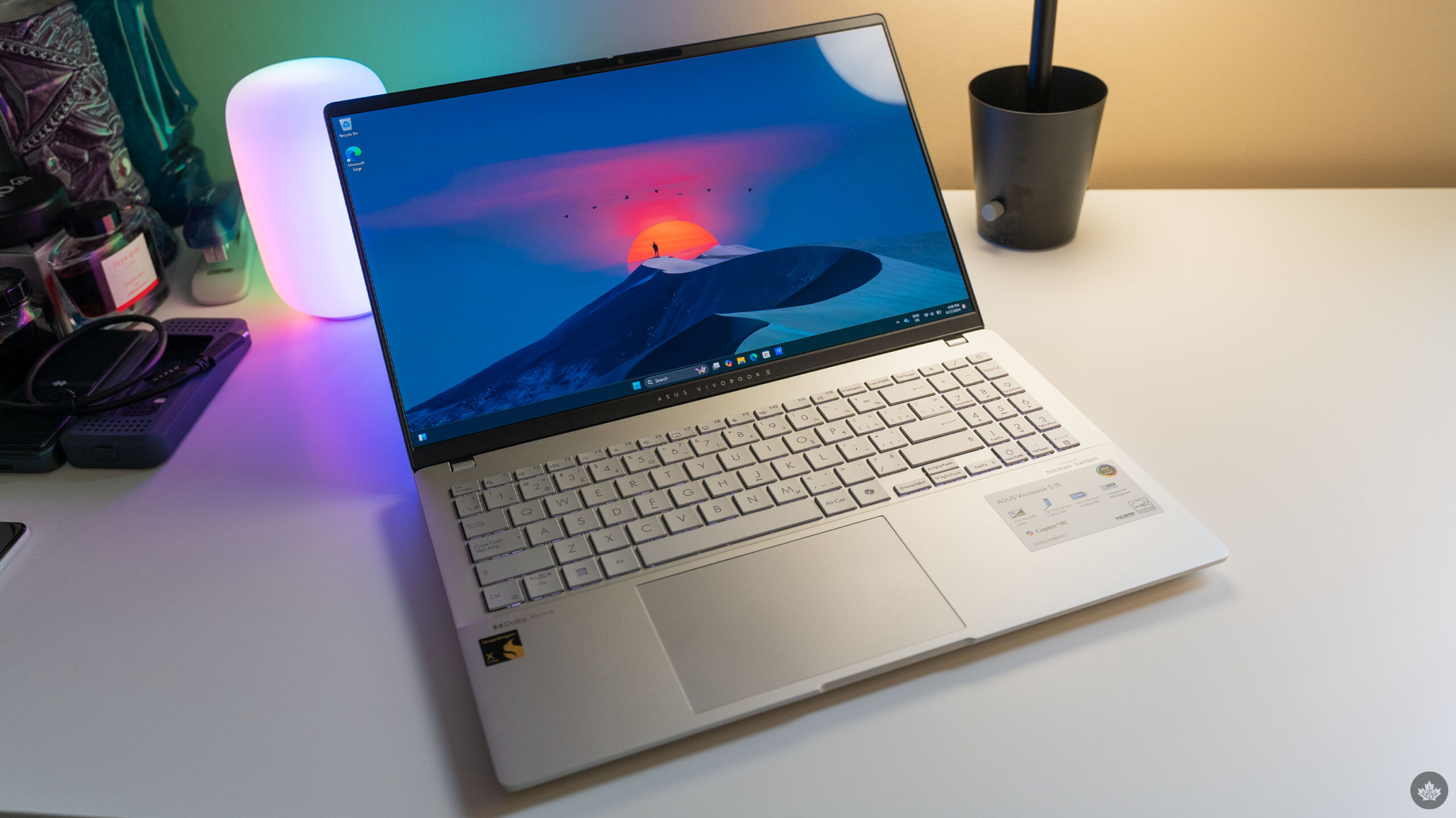
Laptops sporting Qualcomm’s new Snapdragon X Elite and Plus chips are finally available starting June 18th after months of waiting. Unfortunately, I haven’t had as much time to test out the X Elite as I’d like, but I wanted to get some early impressions up for the embargo lift while I continue putting the chip through its paces. And my initial thoughts? X Elite is good, but I don’t think it lives up to the hype.

First, let’s run through what I’m using. Asus sent me a Vivobook S 15 to test out, which so far has been my only experience with the X Elite. I’m definitely curious to see how it fares in other devices, especially since Asus told me it cranked the CPU to 45W, more than other manufacturers did. The Vivobook S 15 I tried also had 16GB of RAM. That’s about all I need to say about Vivobook specs for now, but definitely stay tuned to learn more when my full Vivobook S 15 review drops in the coming weeks.

The other caveats I need to get out of the way are that I’ve spent less than a week with the Vivobook S 15 and that I decided not to do any specific benchmarking because the laptop is running an older version of Windows as the latest update drops on June 18th as well, the day my embargo lifts. There shouldn’t be any significant differences between the current software and the new update, so I’m comfortable sharing these initial impressions, but I decided it was best to delay my more rigorous testing. Plus, I was waiting to see what impact Recall might have, but that’s no longer dropping with the June 18th update.

Battery life a mixed bag…

My initial experience with the X Elite was fairly disappointing since it didn’t live up to the battery life promises made by Qualcomm, Microsoft and others. I was able to burn through about 70 percent battery life in roughly four hours, which frankly isn’t much better (and in some cases, worse) than x86 chips I’ve tried from Intel and AMD. However, after fiddling with some settings, the battery life improved significantly.

Notably, the only two things I changed were switching the laptop’s display from 120Hz to 60Hz (120Hz was on by default), and I didn’t connect the laptop to a secondary display. I almost exclusively use a second display when I work, so the first few days I was testing the battery, I had an external display connected. With no external display and the laptop’s built-in screen locked to 60Hz, the laptop lasted about seven hours to burn through the same 70 percent battery. I decided to plug it in there, but with the battery saver on, you could probably get another two or three hours more. I suspect the 120Hz display is more of a culprit than the external display, given that on days when I used the laptop on my commute into the office, I still had disappointing battery life despite not connecting a monitor.

While it shouldn’t come as much of a surprise that you need to disable some power-hungry features to improve battery life, I was a bit disappointed I could enjoy the higher refresh-rate display. Perhaps a variable rate display would be better. Regardless, I’m willing to trade 120Hz for the much-improved battery life at 60Hz, though I’ll need to do more testing.

… but performance is solid

Vivobook S 15 logo on the laptop lid.

Moving onto performance, it’s worth noting that I ran the Vivobook S 15 in Windows’ ‘Best power efficiency’ setting, something I almost never did with x86 machines since the tradeoff resulted in very poor performance across the board. However, with the X Elite, I noticed virtually no difference between ‘Best power efficiency’ on battery and ‘Best performance’ when plugged in, a testament to the power efficiency of the X Elite compared to x86 chips. Moreover, all this happened without the Vivobook S 15 getting uncomfortably hot. Under heavy loads, it definitely warmed up, but it never got as hot as other Windows laptops I’ve tried.

Speaking of performance, I also encountered no significant issues with apps. I’m not sure how much of this comes down to increased support for ARM chips versus the X Elite just being significantly better than Qualcomm’s previous hardware. Most of my testing so far used the ARM version of Microsoft Edge and Photoshop, both of which worked great with no issues.

Surprisingly, the only app that did give me a bit of trouble was Slack, which had a weird input delay that would see the app take one or two seconds to show what I was typing or to send a message. The app was usable, but the delay became very irritating. The Windows Store indicated that Slack was compatible with my system but I suspect it didn’t actually download the ARM version of the app since when I manually downloaded it from the Slack website, it worked fine. Slack’s ARM app only just came out in beta recently, so perhaps that’s why the Windows Store version was so janky.

Ultimately, my early impressions of the X Elite are mostly positive. Battery life is a small improvement over x86 chips, though how much depends on what features you choose to run or disable. On the other hand, performance is pretty good and, so far in my testing, comparable to x86 chips with minimal issues. That said, users should expect a few kinks from Windows on ARM since it seems Microsoft hasn’t yet worked everything out. There’s still obviously lots of testing to do, but it looks like the X Elite will finally breathe some life into Windows on ARM and bring much-needed improvements to battery life to Windows laptops. It’s not quite the home run that was advertised, but it’s a definite improvement.

Stay tuned to MobileSyrup in the coming weeks for reviews of the Vivobook S 15 as well as other Copilot+PC devices from HP, Microsoft and more.

MobileSyrup may earn a commission from purchases made via our links, which helps fund the journalism we provide free on our website. These links do not influence our editorial content. Support us here.

Testing out the Vision Pro ahead of the launch in Canada

This year at WWDC I was finally able to go hands-on with the Apple Vision Pro, and it’s safe to say it was one of the most mind-bending tech experiences I’ve ever had. It was all I could think about for at least 30 minutes after my demo – I honestly kept chuckling quietly as my mind worked to comprehend how insane Apple’s virtual headset is.

When I first put on the Vision Pro, I was greeted by a dark screen with a few glyphs and instructions to help my eyes focus. Then, after two more setup steps, boom, you’re back in the real world, but now there’s a grid of icons floating in front of you. It’s a smart entry to the system and reminds me of the welcoming feel of a well-designed home – a small entryway leading to a grand reveal.

After taking in the floating grid, my eyes were drawn to the device’s flaws, at least when compared to regular human vision. The slight chromatic aberration at the far edges of the display, the pass-through applying typical Apple photo smoothing to people’s skin, and some light leaking from around my face all shocked me for a few seconds. I’d heard so much about the magic of the Vision Pro, so it was weird to see actual hardware limitations. However, within a few minutes (and for the rest of my 40-minute demonstration), I never noticed those things again. Once I started using the software, there was no turning back.

For most of my time, I found myself looking forward and moving my head to glance around. I didn’t do this on purpose; moving around that way just made sense. Because of this, I stopped noticing the slight aberrations since I rarely looked at the extreme edges of the display and instead just focused on what was in my main field of view. This focus on looking ahead also made the light leak less noticeable, and over time, I just got used to the camera as well.

These are such small things tech issues in a Gen-1 product that I have no fear that Apple will improve them over time, and honestly, it doesn’t matter that much since the current hardware and software are already exceptional.

There have only been two other times in my life when tech has tricked my brain. Once, when playing Flight Simulator in VR, I saw the sun pan across my plane’s dashboard, and I swear I could feel the heat on the back of my neck. The next time I was tricked by tech was during a Project Starline demo at Google I/O. Starline was so realistic and immersive that when the person leading the demo tried to make me take a ball from his hand, I reached out and grabbed for it only to get a fistful of air.

What I got excited about

The first thing that blew me away was the Apple immersive environment I was in. For years, I’ve thought my dream job would be to shoot the drone footage for the Apple TV screensavers, but I’m starting to think that making the Vision Pro Immersive Environments might be even more fun.

The space I demoed was a mountain top in Haleakala National Park at sunset, and it looked incredible. The light coming through the clouds was stunning, and the detail of the rocks at my feet looked perfect. I was only able to test out one environment, but if they’re all as detailed as the mountain I saw, I can’t wait to look around them.

The other thing that’s impossible to really explain without trying the headset yourself is the scale it provides. Blowing up a window to its maximum size is insane. Again, as someone who was late to testing out the headset, I’d heard all about the scale of it, but I never considered it to be as exciting as it was. I got to play an iPad racing game on a giant screen, and it was just cool. It wasn’t’ fully immersive like VR games, but the giant window meant that my whole field of view was taken up by one screen. Which at the end of the day, felt extremely immersive once I started focusing on the race.

Beyond that, I also got to make a slideshow in Keynote, which was a good way to learn the various controls and gestures of the headset. However, when I finished laying out my slide I was able to go into a mode meant to practice your presentation in. Once I clicked that button, I was no longer able to see my real environment, and instead, the headset transported me to a stage so I could feel what it might be like to present. Then, to make it even cooler, when I looked over my back shoulder, my presentation was towering over me, just like it would be at a real event. This was a pretty menial task, but the feeling of immersion it created was extraordinary.

The final thing that blew me away was Apple’s new Immersive videos. There are various events, sports, animals or music venues filmed with a special camera that allows Vision Pro wearers to look around the environment. This is a skill VR headsets have had for years, but Apple showed me a small snippet of an Alicia Keys studio session, and it was breathtaking. Suddenly, this superstar was singing right in front of my eyes, and the Vision Pro speakers’ sound made me feel like I was right there with her. I’m not even joking, but as soon as I picked my jaw off the floor, I cranked the volume, and it didn’t disappoint.

Review coming

While I left my initial demo giddy and excited, I do wonder what using the device daily will be like? Will it be heavy? Will it be fun to use if none of my friends have one? Is it really a better movie experience than the projector I have at home?

Only time will tell, so make sure to check back into MobileSyrup before the Vision Pro hits store shelves on July 12 to see how a prolonged experience felt, what it’s like to get one at a store in Canada, and I’ll also be testing as many apps as I can.

The device is in a pre-release stage in Canada right now and will remain in that holding pattern until it goes up for pre-orders on Friday, June 28th at 5am PT/8am ET. The Vision Pro will then become available on July 12th. In the box, buyers can expect both the Dual Loop Band and the Solo Band, a personalized light seal with two cushions, a cover for the headset, a polishing cloth, the battery, a USB-C charging cable and a USB-C power adapter.

The 256GB option starts at $4,999. The 512GB option starts at $5,299, and the top-end 1TB model is $5,599. You can shop for the Vision Pro here.

MobileSyrup may earn a commission from purchases made via our links, which helps fund the journalism we provide free on our website. These links do not influence our editorial content. Support us here.